
Guru Maps — GPS Route Planner
Evgen BodunovTravel & Local
4.4163.00 Reviews
- Version
- 5.9.2
- Installs
- 1.00M
- Age Rating
- Everyone
Screenshots
Our Review of Guru Maps — GPS Route Planner
 Analysis by Appyee
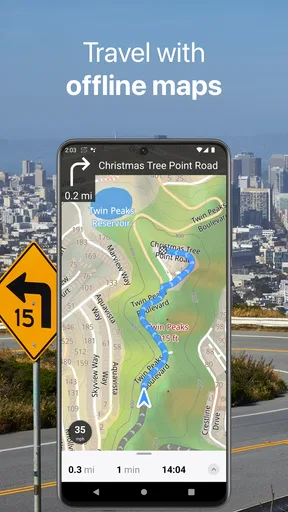
I like to think of a map app as something I prepare before I need it, not something I start figuring out while standing at a busy intersection. Guru Maps — GPS Route Planner suits that habit: it is a travel and local navigation app from Evgen Bodunov, with offline use at its centre. I would consider it for trips where mobile coverage may be unreliable, as well as for getting oriented in an unfamiliar place. The key is to treat downloading and checking a map as part of the journey, rather than assuming every useful detail will appear automatically.
A sensible routine before setting out
My preferred workflow is simple: open the map while I have a connection, locate the area I expect to visit, and make sure the relevant map is available offline before leaving. That small bit of preparation matters more than any clever navigation trick. A country-sized download may sound reassuring, but for a short outing I would focus on the places I will actually travel through; a more targeted choice is easier to manage and less likely to leave me wondering whether I prepared the right region.
For a day in a new city, I would check the hotel, station, and likely places to visit before setting off. Then I can use the map to orient myself even if a station concourse or underground stretch interrupts reception. Offline access is especially useful as a fallback, but it is not magic: a map saved ahead of time is only helpful if it covers the route I need. I would still check directions and local travel arrangements when I have a connection, particularly before a long drive or a hike.
Settings and habits that earn their place
Location access is part of getting started, and I would check that the app can locate me when I actually need navigation. Map appearance is another practical choice rather than just decoration. A theme that is comfortable to read in bright daylight may not feel right after dark, so I would adjust it to the conditions instead of leaving the screen on a setting that strains my eyes.
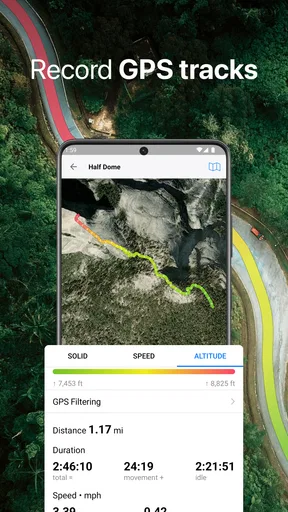
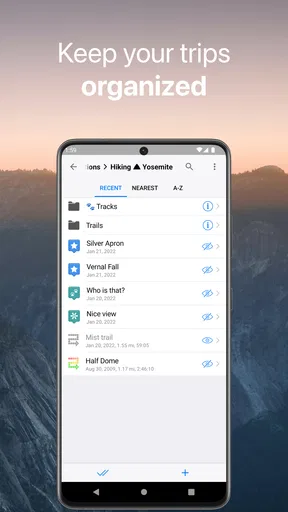
I also find it useful to separate two jobs: using the map to choose where to go, and recording where I have been. Guru Maps includes track recording, which can help me revisit a walk or ride later. I would start tracking deliberately when a route is worth keeping, then stop when the outing is over; otherwise, saved activity can become harder to interpret. That small habit makes recorded journeys more useful than treating the feature as something to switch on without a purpose.
Where it fits, and where it does not
Compared with the map apps many people already use for quick searches and everyday directions, Guru Maps makes a stronger case when offline preparation is part of the plan. A familiar online-first app may be more convenient when I just want to search for a nearby café or follow a routine city route with a live connection. For travel beyond dependable coverage, a downloadable map is a more meaningful advantage. I would choose based on the trip, rather than expecting one app to be best at every kind of navigation.
There are trade-offs. Offline maps require advance attention, and a route plan can only be as useful as the map area I have prepared. I would not rely on an offline screen alone as a substitute for checking current conditions or local signs, especially on a complicated drive or outdoor route. If I mainly want live traffic-led commuting and already depend on another navigation service for that, switching may not add enough to justify changing my routine.
Who will get the most from it
I think it is a good fit for travelers who want a map ready before a trip, walkers and cyclists who like keeping track of a route, and people who sometimes travel where a data connection is uncertain. It can also work as a backup for ordinary city navigation, provided the relevant map is on the device. Someone who rarely travels, always has reliable service, and only needs quick business searches may find a standard online map simpler.
A realistic use case is a weekend visit to a town I do not know. Before leaving home, I would prepare the town’s map, check the first leg from the station, and note the area where I expect to spend the afternoon. Once there, I can use the downloaded map to stay oriented if the signal drops, then record a walk if I want to retrace it later. The benefit is not that every uncertainty disappears; it is that I have a useful fallback rather than depending on a connection at the exact moment I need directions.
Getting Started with Guru Maps
When I first downloaded Guru Maps, I was immediately impressed by its clean and intuitive interface. No unnecessary clutter; just a simple map with all the essential tools at your fingertips. Setting it up was a breeze. You just need to allow location permissions, and you’re good to go.
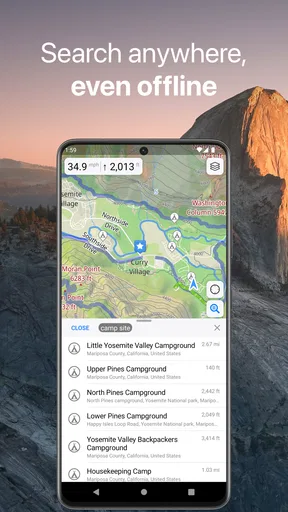
One of the standout features is the offline maps. I mean, how many times have you found yourself in a dead zone with no signal? With Guru Maps, you can download maps of entire countries, so you never have to worry about losing your way, even offline. It’s like having a physical map, but way more convenient.
Features That Make a Difference
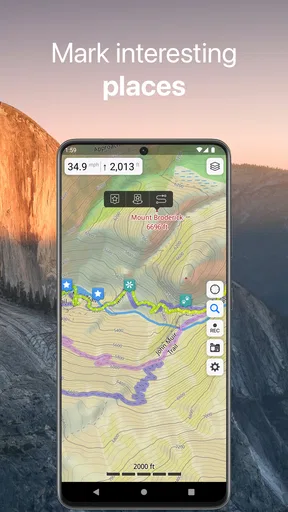
The app isn’t just about getting from point A to B. It offers detailed information on routes, points of interest, and even hiking trails. I particularly loved the turn-by-turn navigation which is clear and concise. No more second-guessing your next turn!
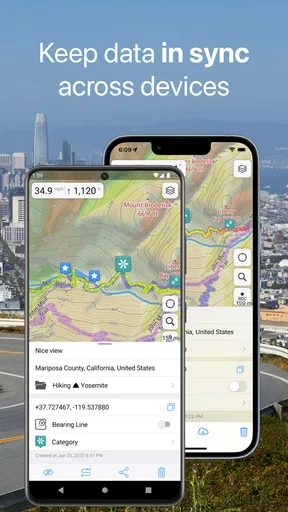
Another killer feature is the ability to track your journey. Whether you’re hiking, biking, or just taking a leisurely stroll, you can save your tracks and revisit them later. This is perfect for those who love to document their travels or share their adventures with friends.
Navigating through cities was equally seamless. The app provides real-time traffic updates, helping you avoid those pesky jams. I found the lane guidance feature super helpful, especially when driving in unfamiliar territory. It’s like having a co-pilot who never sleeps.
User Experience and Design
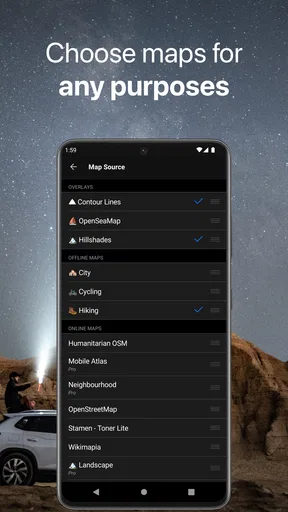
The design of Guru Maps is minimalist yet functional. The fonts are easy to read, and the icons are self-explanatory. I appreciated the option to customize the map’s appearance with different themes. Whether you prefer a night mode or a more vibrant look, it’s all adjustable to suit your preferences.
One thing that really stood out to me was how responsive the app is. There’s no lag when zooming in and out, and the map loads quickly even when you’re offline. This makes it ideal for anyone who values speed and efficiency in a navigation app.
Making the map useful in everyday travel
For a regular commute, I would use a different standard than I would for a holiday. If the route is familiar and the connection is reliable, the convenience of a mainstream online map may matter more than offline preparation. Guru Maps is more compelling when I want to keep a prepared map close at hand, explore a place on foot, or avoid making the journey depend entirely on mobile data.
Before a drive, I would decide whether I need the app as my main navigator or as a backup map. That distinction keeps expectations realistic. A saved map can help me understand where I am and where roads lead, while traffic-sensitive decisions depend on having current information. I would not start a drive expecting offline access to provide the same live picture as an online service.
For a walking day, I would use a repeatable sequence: prepare the area, check the first destination, then begin a track only when I want a record of that particular outing. This is a small but useful distinction. A map helps with orientation; a saved track helps me look back at the path I took. Keeping those purposes separate makes the app easier to use without turning every trip into a project.
What to expect from downloads and navigation
A common question is whether the app remains useful without reception. Yes, that is one of its main reasons to consider it, as long as the map for the area is already available offline. I would not wait until reaching a dead zone to prepare. Nor would I assume that downloading a broad area automatically answers every routing question; checking the map and the route while connected is a sensible precaution.
Another practical question is whether it can replace a familiar navigation app. For me, that depends on the trip. If I want a map for a low-signal journey and a way to record a walk or ride, it has a clear role. If my priority is quick online searches, live traffic decisions, or a routine commute where an existing app already works well, I would keep using that service rather than switch just for the sake of having one map app.
The app is free to install, with in-app purchases ranging from $2.99 to $89.99 per item. It has a 4.4 average from around 13,000 ratings and has been installed over a million times. It is rated for Everyone, and version 5.9.2 requires Android 5.0 or later. Those details make it easy to assess basic access, but I would still look at the purchase options in the app and decide whether any paid item is useful for my own routine before spending.
Choosing it with clear expectations
Guru Maps is not the right pick for someone who wants every part of travel handled automatically or who has no interest in preparing maps. It rewards a little forethought: decide where you are going, make the relevant area available, and choose whether the outing calls for navigation, a track, or simply a readable map. That is a good exchange for travelers who value having a plan B when reception is poor, but unnecessary friction for people who only need an occasional address search.
My overall view is that it is most useful as a deliberate travel tool, not merely another icon to tap when lost. Evgen Bodunov’s app puts offline readiness, route information, and journey tracking into one map-focused experience. I would recommend it to someone who takes unfamiliar walks, rides, or trips beyond dependable coverage and is willing to prepare before leaving. If live, connection-dependent convenience is the only thing you need, a familiar alternative may suit you better.
Features That Make a Difference
The app isn’t just about getting from point A to B. It offers detailed information on routes, points of interest, and even hiking trails. I particularly loved the turn-by-turn navigation which is clear and concise. No more second-guessing your next turn!
Another killer feature is the ability to track your journey. Whether you’re hiking, biking, or just taking a leisurely stroll, you can save your tracks and revisit them later. This is perfect for those who love to document their travels or share their adventures with friends.
Navigating through cities was equally seamless. The app provides real-time traffic updates, helping you avoid those pesky jams. I found the lane guidance feature super helpful, especially when driving in unfamiliar territory. It’s like having a co-pilot who never sleeps.
User Experience and Design
The design of Guru Maps is minimalist yet functional. The fonts are easy to read, and the icons are self-explanatory. I appreciated the option to customize the map’s appearance with different themes. Whether you prefer a night mode or a more vibrant look, it’s all adjustable to suit your preferences.
One thing that really stood out to me was how responsive the app is. There’s no lag when zooming in and out, and the map loads quickly even when you’re offline. This makes it ideal for anyone who values speed and efficiency in a navigation app.
Wrapping It Up
So, is Guru Maps — GPS Route Planner worth the download? Absolutely. It’s more than just a map app; it’s a comprehensive travel companion. Whether you’re exploring a new city, planning a road trip, or hiking in the mountains, it has got you covered. The offline maps, detailed navigation, and user-friendly design make it a must-have for any traveler.
And hey, it’s not just for the adventurers. Even if you’re just looking for a reliable app to get you through your daily commute, Guru Maps can handle that too. So next time you’re in need of some direction (literally), give it a shot. You might just find it becomes your new favorite app.
Verdict
Strengths of Guru Maps — GPS Route Planner
- Offline maps available worldwide.
- High-precision GPS tracking.
- Detailed terrain and traffic data.
- Customizable map layers.
- Route planning with multiple waypoints.
Limitations of Guru Maps — GPS Route Planner
- No real-time social features.
- Limited voice navigation options.
- Some features require a subscription.
- Occasional map rendering delays.
- Interface can be overwhelming for beginners.
Other Releases by Evgen Bodunov
View All
Guru Maps Pro & GPS Tracker
Maps & Navigation4.5
Similar Picks in This Category
View All
Google Maps
Google LLC3.4

Google Maps Go
Google LLC4.1

Booking.com: Hotels & Travel
Booking.com Hotels & Vacation Rentals4.8

Google Earth
Google LLC3.8

Skyscanner Flights Hotels Cars
Skyscanner Ltd4.8

trivago: Compare hotel prices
trivago N.V.4.4
Frequently Asked Questions
What features does Guru Maps offer for offline navigation?
Guru Maps provides comprehensive offline navigation features, allowing you to download maps for entire countries or regions. This means you can access detailed maps and turn-by-turn navigation without an internet connection. The app also offers offline search, route planning, and points of interest, making it ideal for travelers in areas with limited connectivity.
How accurate is the GPS tracking in Guru Maps?
Guru Maps employs high-precision GPS tracking to ensure accurate location services. The app is designed to maintain accuracy even in challenging environments like dense urban areas or remote landscapes. Users can rely on it for precise turn-by-turn instructions, real-time location sharing, and detailed altitude data, ensuring a reliable navigation experience.
Is Guru Maps suitable for outdoor activities like hiking or cycling?
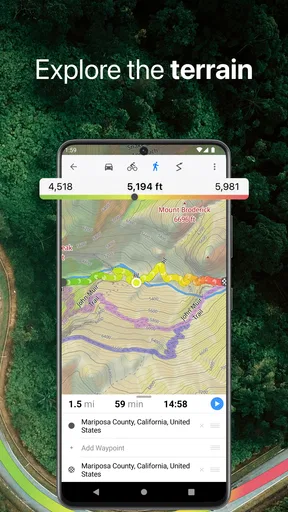
Yes, Guru Maps is well-suited for outdoor enthusiasts. It offers detailed topographic maps, contour lines, and elevation data, making it perfect for hiking, cycling, and other outdoor activities. The app supports GPX file imports and exports, allowing users to plan routes and track their adventures with ease, catering to both casual and serious explorers.
What customization options are available in Guru Maps?
Guru Maps offers various customization options to enhance user experience. You can choose from different map styles, adjust the color schemes, and personalize route preferences like avoiding toll roads or highways. Additionally, the app allows users to customize the dashboard widgets, providing quick access to the information most relevant to their needs.
Does Guru Maps support real-time traffic updates?
While Guru Maps excels in offline navigation, it also supports real-time traffic updates when you have an internet connection. The app provides live traffic conditions, helping users avoid congestion and plan faster routes. This feature is particularly useful for commuters and travelers who need to adjust their journeys based on current traffic scenarios.
